

Rain Alarm
Michael Diener - Software
I usually open a weather app to answer one practical question: can I leave the house now, or should I wait? Rain Alarm is built around that small decision rather than around a long forecast report. It is a free weather app from Michael Diener - Software, and its main job is to alert you when rain is moving toward your location. That focused approach makes it appealing when timing matters more than reading a complete weather briefing.
After spending time with it, I found the app easiest to appreciate as a short-term planning tool. It is useful before walking the dog, cycling to work, hanging laundry outside, or deciding whether a quick trip can be made without an umbrella. It does not try to replace every weather service on your phone. Instead, it concentrates on the immediate possibility of rain and turns that information into a more direct warning.
The app is free to install and is suitable for Everyone. Optional in-app purchases range from around one dollar to around fifty-five dollars per item, so I would check the purchase screen carefully before confirming anything. Its public reception is strong, with a 4.5 average from around sixty-nine thousand ratings, about 1.4 thousand written reviews, and over ten million installs. Those figures suggest that the simple rain-warning idea works for a large audience, although popularity alone does not guarantee that it will match every person’s expectations.
Getting from installation to a useful rain warning
What to expect when you open it
The first thing to understand is the difference between a rain alarm and a conventional weather app. A typical weather app leads with temperatures, hourly forecasts, wind, humidity, sunrise times, and several days of outlooks. Rain Alarm puts the immediate rain question first. That makes the experience feel less like browsing a weather dashboard and more like checking a nearby situation before committing to an activity.
I would recommend approaching it with a specific use in mind. If you want to know whether the next walk is likely to be interrupted, the app’s focused design makes sense. If you want to compare temperatures for the coming week or plan a holiday around several weather variables, you may still prefer a broader forecast service. Its strongest role is immediate rain awareness, not all-purpose meteorology.
Related News

Instagram Is No Longer a Photo App. It Is an Attention Engine

Microsoft Teams Mobile: When Collaboration Becomes Navigation

How the NFL App Adapts to Android and iOS Updates

Temu: Elevate Your Shopping Experience to Billionaire Status

Why Traffic Rider Works Best as a Precision Reflex Game

How Google’s Find Hub Transforms Everyday Searches
The name can also create an expectation of a dramatic emergency notification. In everyday use, I found it more helpful to think of the warning as a prompt to check conditions rather than an absolute guarantee. Rain can change direction, weaken, arrive earlier, or miss a particular street. A notification is useful evidence for a decision, but I would not treat it as permission to ignore local conditions or official warnings during severe weather.
The first setup: keep it simple and deliberate
After installation, take a moment to make sure the app is watching the place that matters. For most people, that will be the current location. If you are preparing for a commute or an outdoor appointment somewhere else, choose the relevant place instead of assuming that your phone’s position is always the right reference. This is a small step, but it prevents the most frustrating kind of weather alert: an accurate warning for the wrong location.
When the app asks for access related to location or notifications, I would read each request rather than approving everything automatically. Location is naturally relevant to a local rain warning, while notifications are what make an alarm useful when the app is not open. Your phone’s system settings can later affect whether alerts appear promptly, so it is worth checking that notifications are allowed and that battery-saving rules are not quietly restricting the app.
Gallery
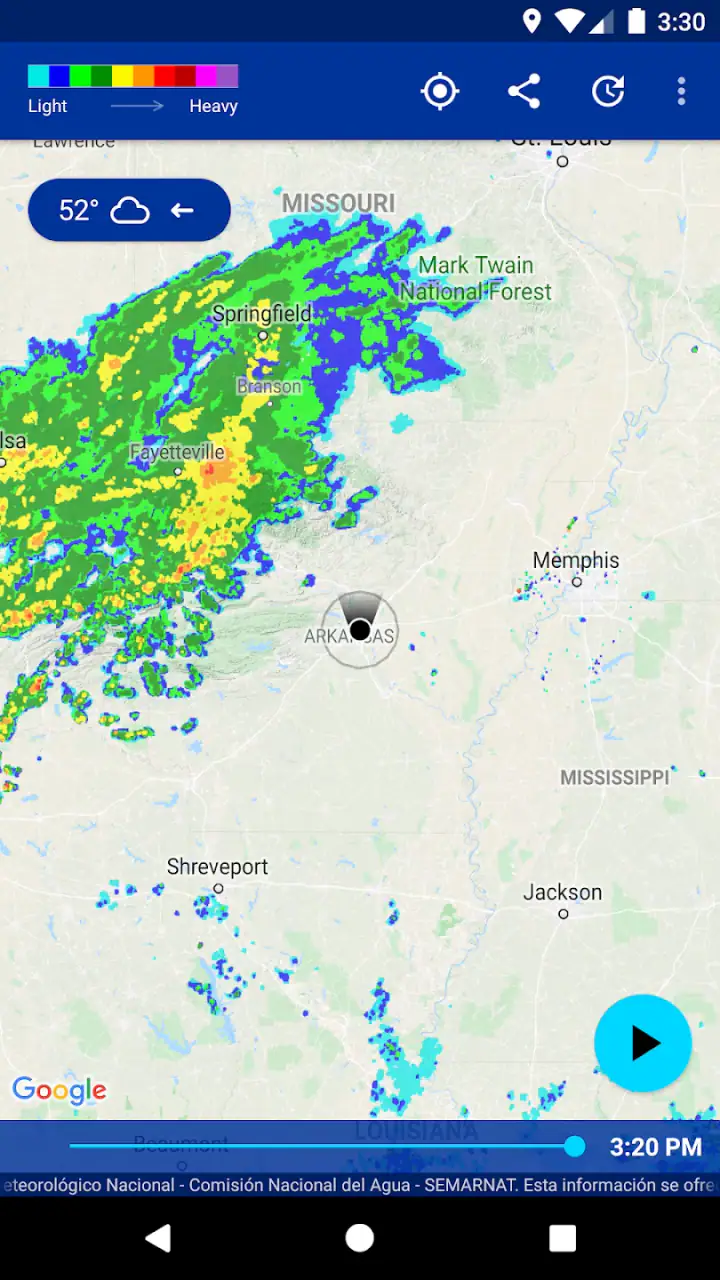
I also suggest testing the basic screen before changing anything else. Confirm that the displayed place is recognizable, look at the rain information, and then close the app for a while. This gives you a clear baseline. If you immediately adjust every available setting, it becomes harder to tell whether a later problem comes from the app, from the phone, or from an overly aggressive configuration.
One practical habit is to set up the app at home before relying on it during a busy morning. Check it once while you have time, then use it on a normal day when the sky is unsettled. That first low-pressure test shows whether the alerts arrive in a way you find useful and whether the warning timing suits your routine.
Your first successful action
The first meaningful success is not simply seeing a weather screen. It is making a better small decision. Imagine that I am about to cycle to a nearby shop. The sky is grey, but there is no rain yet. I check the app, see that rain is approaching, and decide to leave later or take a jacket. If the shower passes before I go, the app has already done its job even though I never needed to react to a loud, urgent alert.
For a stronger test, use the app before an activity that lasts long enough for changing conditions to matter. A dog walk is a good example. Check the warning, decide whether to go immediately, and then compare what happened with what the app indicated. This is more informative than opening it once on a completely clear day. You are learning how its warnings fit your own neighborhood and your own tolerance for getting caught in rain.
I found that the most useful workflow is quick and repeatable: check before leaving, make one practical adjustment, and avoid constantly refreshing the screen. If rain is approaching, the decision may be to wait, shorten the route, carry protection, or move the activity indoors. The app is valuable because it reduces hesitation, not because it removes every uncertainty from the weather.
For outdoor work, the benefit can be even clearer. Someone painting a fence, washing a car, setting up a market stall, or planning a garden task can use the warning as one part of a go-or-wait decision. The important trade-off is that a rain alert may help with timing but cannot tell you whether the ground is already too wet, whether wind will make the task unsafe, or whether a long project can be completed before conditions change.
Common confusion and where expectations need adjusting
The biggest possible misunderstanding is expecting a rain warning to behave like a full forecast. Rain Alarm’s focused purpose is a strength when you only need near-term rain information, but it can feel limited if you are searching for a broad picture. I would keep another weather source available for temperature trends, extended planning, or a more complete view of changing conditions.
Another point of confusion is the difference between “rain is approaching” and “rain will definitely fall directly on me.” Local showers are uneven. A warning can be useful even when the rain later shifts away, and a quiet period does not guarantee that conditions will remain unchanged. Treat the alert as a timely signal, then use common sense: look outside, consider the direction of travel, and allow extra caution when the consequences of getting wet are serious.
Notification timing can also vary for reasons that are not obvious. A phone may delay background activity to save battery, a user may have disabled alerts, or a weak connection may affect updates. I would not wait until the exact moment of departure to discover that notifications are blocked. Check the app’s behavior during ordinary use and review the phone’s notification and battery settings if an expected warning does not appear.
There is also a difference between wanting an alert and wanting silence. People who work outdoors may welcome frequent warnings, while someone who checks manually may find repeated notifications distracting. Start with the least intrusive setup that still helps you. If the app becomes noisy, reduce its role rather than abandoning it immediately; a rain tool is only useful when you trust it enough to keep enabled.
The optional purchase model deserves a calm approach as well. The basic app is free, which makes it easy to try without committing money. Because individual in-app purchases can range from around one dollar to around fifty-five dollars, I would not assume that every extra option is necessary. Use the free experience first, decide whether the central warning function genuinely improves your routine, and only then consider whether a paid addition solves a problem you actually have.
Three details that make the app more useful in real life
First, use it as a decision checkpoint rather than as a screen you stare at continuously. Checking just before leaving and once again before a longer outdoor activity creates a simple routine. This reduces the temptation to refresh constantly and makes the warning meaningful: it either changes your plan or confirms that you can proceed.
Second, compare the warning with what you can see around you. If the app indicates approaching rain while the sky is still bright, that is precisely when the tool has practical value. If the view outside and the warning disagree, do not force one answer. Give yourself more time, choose a shorter route, or carry protection. This approach turns uncertainty into a manageable trade-off instead of a test the app must pass perfectly.
Third, use a personal threshold. For a quick trip to a nearby store, I might accept a small chance of getting caught and leave with a light jacket. For a long bike ride or an event where there is no shelter, I would require more confidence and would also check a broader weather source. The same alert can lead to different actions depending on the cost of being wrong, and the app works best when you make that judgment consciously.
A fourth useful habit is to separate rain timing from safety decisions. A warning can help me choose when to walk, but it does not replace judgment about lightning, flooding, strong wind, poor visibility, or dangerous roads. In those situations, I would consult official local guidance and prioritize safety over convenience. This is not a weakness unique to the app; it is a reminder that a narrow tool should not be stretched beyond its purpose.
Who will appreciate it, and who should skip it
I think Rain Alarm is a particularly good fit for people whose schedules are shaped by short outdoor trips. Dog owners, walkers, cyclists, parents taking children to activities, commuters, and anyone who regularly hangs clothes outside can benefit from a quick rain-focused check. It is also approachable for first-time users because its central question is easy to understand: is rain moving toward me soon enough to affect my plan?
It may also suit people who dislike cluttered weather applications. If a screen full of charts and forecast categories makes you hesitate, a more focused rain tool can feel refreshing. The app’s value is not that it gives more information than every alternative; it is that it emphasizes one piece of information at the moment you need it.
I would skip it as a primary weather app if your main needs involve long-range planning, detailed travel forecasts, agricultural decisions, aviation, marine conditions, or severe-weather monitoring. In those cases, a service designed around the relevant specialist information is a better choice. I would also avoid relying on it alone when missing a shower would have serious consequences, because no short-term rain indicator removes the uncertainty of local weather.
Compared with the usual weather app already installed on a phone, Rain Alarm offers a narrower and potentially faster workflow. The standard app is generally better for a complete overview; this one is better when rain timing is the only question. Compared with checking a radar map manually, it can save effort by bringing attention to an approaching change, but manual radar inspection may be preferable when you need to judge a complicated storm pattern or a larger travel area.
The next step after the first week
After using it for several ordinary situations, decide whether the alerts change your behavior in a useful way. Do you avoid unnecessary wet walks? Do you carry an umbrella only when it is sensible? Do you start outdoor jobs at better times? Those are better measures of success than how impressive the interface looks. If the app repeatedly helps you make small, confident adjustments, it has earned a place on your phone.
If it does not fit, the answer may be to change your routine rather than to keep searching through settings. Use it manually instead of depending on notifications, pair it with a broader forecast app, or remove it if you rarely need immediate rain information. The free installation makes this trial relatively straightforward, while the optional purchases are best treated as a later decision rather than part of the initial setup.
My overall impression is that Rain Alarm succeeds by staying close to a real everyday problem. It does not need to become a complete weather center to be useful. When I want to know whether I should leave now, wait a little, or take rain protection, its focused design gives me a practical starting point. I recommend it as a companion for short-term outdoor decisions, not as the only source for every kind of weather planning.
For a first-time user, the best path is reassuringly simple: install it, confirm the location, allow the alerts you genuinely want, test it during a normal unsettled day, and judge it by the decisions it improves. That approach lets the app show its real strength without demanding that you trust every warning blindly. Used with sensible expectations, it is a focused weather companion from Michael Diener - Software that can make ordinary plans a little easier.
FAQs for Rain Alarm
What is Rain Alarm and how does it work?
Rain Alarm is a weather app focused on short-term precipitation alerts. It uses radar data and your selected location to show whether rain or snow is approaching, often with an animated map and estimated arrival time. During testing, the app was most useful for quick decisions such as commuting, walking, cycling, or planning outdoor activities, rather than for long-range weather forecasting.
Does Rain Alarm provide accurate notifications?
Rain Alarm can provide helpful warnings when precipitation radar coverage is available and current, but accuracy depends on your country, local weather service, radar quality, and the speed at which conditions change. The app should be treated as a practical indication rather than a guarantee. Sudden showers, weak radar coverage, mountainous areas, and rapidly developing storms may cause alerts to arrive late or differ from actual conditions.
Does Rain Alarm require location access and an internet connection?
The app generally needs an internet connection to download updated radar images and weather information. Location permission is useful for automatically monitoring your surroundings, although users can usually select or search for a location manually. If location access is disabled, you may still be able to use the map and alerts after choosing a place yourself, but automatic local notifications and convenience features may be limited.
Is Rain Alarm free to download and use?
Rain Alarm is commonly available as a free download, but the exact features, advertising, and optional purchases can vary between Android and iOS versions and by region. Some editions may offer premium options such as removing advertisements, adding extra notification controls, or unlocking additional information. Before installing, check the current store listing to confirm pricing, subscriptions, and included features.
Can Rain Alarm replace a complete weather forecast app?
Rain Alarm is designed primarily for immediate precipitation warnings, so it should not completely replace a full weather service. It may not provide the same depth of information about temperatures, wind, humidity, hourly forecasts, or severe-weather advisories. In our experience, it works best alongside a broader weather app: use Rain Alarm for rain timing and radar movement, and another trusted source for general daily planning and official warnings.
Pros
- Accurate short-term rain forecasts with clear timing alerts.
- Interactive radar map makes approaching showers easy to track.
- Customizable notifications help avoid unnecessary weather checks.
- Useful location support for monitoring home
- work
- or travel areas.
- Clean interface provides essential weather information at a glance.
Cons
- Some advanced radar and forecast features may require a subscription.
- Frequent alerts can become distracting during unstable weather.
- Radar coverage and accuracy vary by country and local data sources.
- The app may use extra battery when location tracking stays enabled.
- Limited forecast detail compared with full-featured weather applications.


